flowchart TB
  G["AI-generated code<br/>on the screen"] --> Q{"Read, test, and<br/>understand it?"}
  Q -->|"No: accept and move on"| P1["Faster today"]
  P1 --> P2["Skill plateaus<br/>or erodes"]
  P2 --> P3["'House of cards':<br/>the last 30% you<br/>cannot debug is the<br/>30% that fails"]
  Q -->|"Yes: read, test, ask why"| D1["Slower today"]
  D1 --> D2["Idioms, patterns,<br/>and judgement<br/>accumulate"]
  D2 --> D3["Faster and safer<br/>over time; you remain<br/>the accountable<br/>author"]
4 Programming with AI: Becoming a Better R and Python Programmer
Debugging is twice as hard as writing the code in the first place. Therefore, if you write the code as cleverly as possible, you are, by definition, not smart enough to debug it.
Brian W. Kernighan and P. J. Plauger, The Elements of Programming Style (1978)
4.1 Learning objectives
By the end of this chapter you should be able to:
- Distinguish the two modes of AI-assisted programming, acceleration and exploration, and choose between them deliberately for a given task.
- Read, test, and verify AI-generated analysis code rather than accepting it, and recognize the failure modes that make plausible statistical code wrong.
- Use AI in ways that build durable programming skill (learning idioms, requesting explanations, refactoring, writing tests) rather than erode it.
- Weigh the empirical evidence on AI-assisted productivity and skill, including the tension between the two, and state its limits.
- Set up an AI-assisted workflow in R or Python that keeps the researcher, not the model, the accountable author of the analysis.
4.2 Orientation
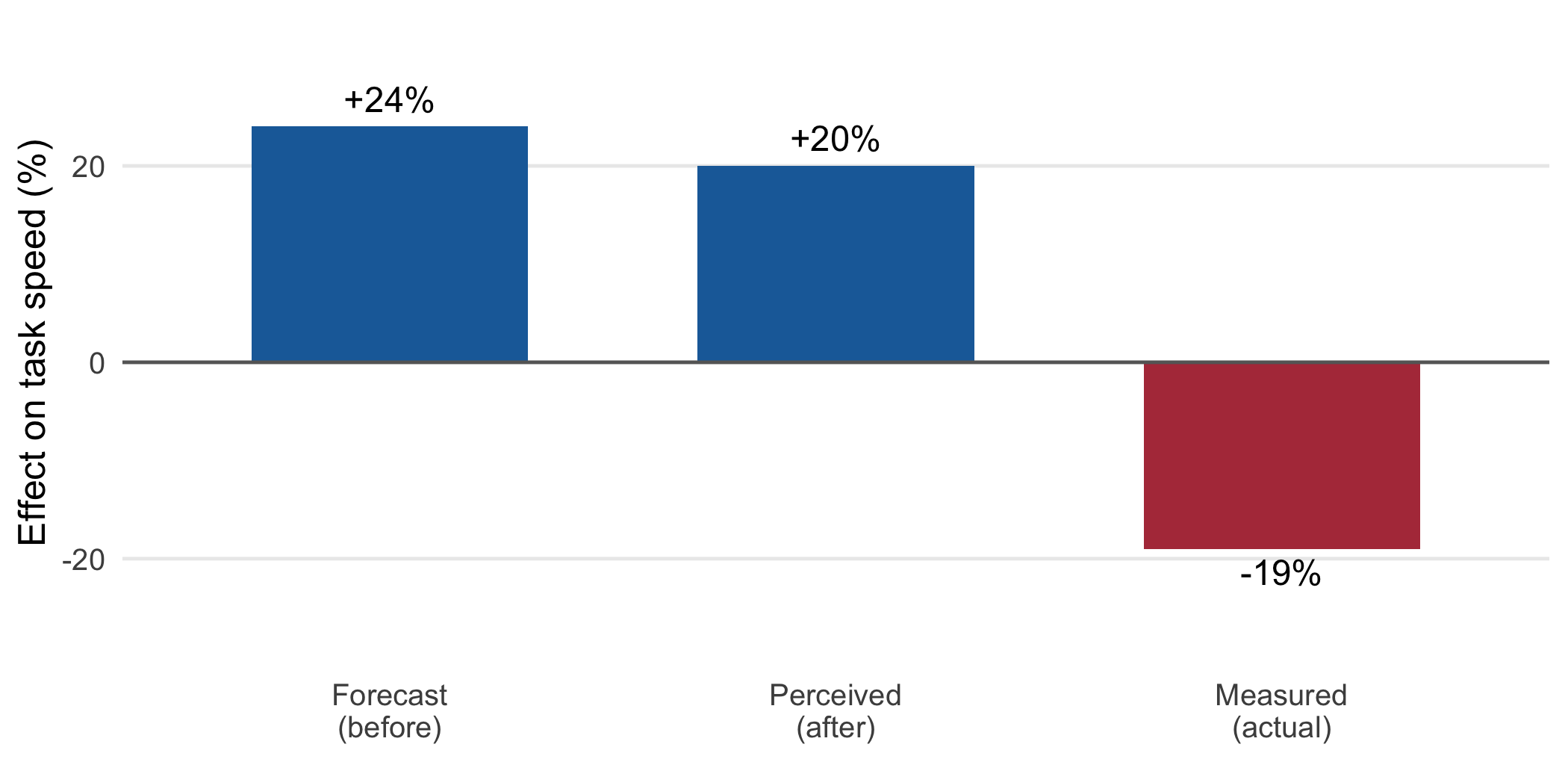
We begin with an apparent contradiction. In an early and much-cited controlled experiment, developers given GitHub Copilot completed a programming task 55.8% faster than a control group (Peng et al., 2023). Two years later, a carefully run randomized trial of experienced open-source developers working in their own repositories found the opposite: with early-2025 AI tools the developers were about 19% slower, even as they believed, before and after, that the tools had made them roughly 20% faster (Becker et al., 2025). Two credible studies, two opposite headline numbers. Which is it, then, faster or slower?
The honest answer is that the question is under-specified. The effect of an AI assistant on a programmer’s speed, and on the more important quantity, the programmer’s skill, depends on who is using it, on what kind of task, and above all on how. That last dependency is the subject of this chapter. Our claim is a conditional one: working with AI can make you a better R or Python programmer, but the synergy is not automatic. It is available to the researcher who treats the model as a collaborator to be directed and verified, and it is largely denied to the one who treats it as an oracle to be trusted. Figure 4.1 sketches the fork, which we shall spend the chapter making concrete.
For the health-sciences researcher the stakes of that choice are not confined to a personal skill trajectory. The code a biostatistician or epidemiologist writes is part of the analysis, and an analysis that informs a clinical guideline or a public-health decision must be reproducible and correct. A silent defect in an AI-generated data-cleaning step, a join that quietly duplicates rows, a date parsed in the wrong locale, a denominator drawn from the wrong table, does not announce itself as a syntax error. It produces a plausible number that is wrong, and the researcher who accepted the code unread is in no position to catch it. The discipline this chapter urges is therefore continuous with the book’s larger theme: capability and the difficulty of verifying it rise together, and the researcher’s contribution is the verification.
The chapter proceeds as follows. We look first at what the evidence actually shows, productivity and skill both, and at why the two studies above disagree. We then distinguish the two modes of interaction and the different verification each demands. We argue that reading code, rather than writing it, is the skill that now scales, and we set out the concrete practices by which AI use builds skill rather than eroding it. We close with the tooling available in R and Python and a worked public-health example.
4.3 The researcher’s contribution
Three judgments are not delegable.
(Judgment 1.) What to delegate, and what to keep. The first judgment is about your own competence. Some of the work you could hand to a model is work you need to keep doing in order to remain able to check the model. A researcher who has never written a survival analysis by hand cannot readily tell whether the model’s version handles censoring correctly. The decision of which tasks to delegate wholesale, which to delegate but read closely, and which to keep doing yourself for the sake of the skill, is yours, and it is not a decision you can make once and forget. It shifts as your expertise grows and as the tasks change.
(Judgment 2.) The verification of what comes back. The model produces code; you sign the analysis. Between those two facts sits the reading, testing, and sanity-checking that the model cannot do on your behalf, because it is precisely the check on the model. Perry and colleagues found that participants with an AI assistant wrote less secure code than those without, and, more tellingly, were more likely to believe their insecure code was secure (Perry et al., 2023). The verification regime is not optional and it is not the model’s responsibility.
(Judgment 3.) The learning contract with yourself. It is possible to use these tools in a way that makes each task easier and leaves you no more capable at the end of a year than at the start. It is also possible to use them as the most patient tutor you have ever had. Which one you get is a matter of deliberate practice, not of the tool. Prather and colleagues found that novices with strong metacognitive skills were helped by generative AI while those with weaker metacognitive skills were harmed, the gap between the two widening rather than closing (Prather et al., 2024). The contract is with yourself: to use the assistance in the service of understanding rather than as a substitute for it.
These judgments distinguish the researcher who becomes better through AI from the one who becomes dependent on it.
4.4 What the evidence actually shows
Before prescribing habits we should look squarely at the evidence, which is genuinely mixed and worth holding in full rather than in the half that flatters one’s prior.
On the encouraging side, the Copilot experiment already mentioned found a large speed-up on a self-contained task, and, notably, the least experienced developers benefited most (Peng et al., 2023). A large observational study at GitHub found that developers who adopted Copilot reported higher satisfaction and that acceptance rate, the fraction of suggestions kept, predicted perceived productivity (Ziegler et al., 2024). For well-bounded, familiar-shaped tasks, the assistance is real.
On the cautionary side, the picture darkens as tasks become larger and developers more expert. The randomized trial of experienced open-source developers found a 19% slowdown on real tasks in mature codebases, together with a striking perception gap: the same developers forecast a 24% speed-up beforehand and estimated a 20% speed-up afterward (Becker et al., 2025). That a user’s expectation of these tools outruns their experience of them was noted in the earliest usability studies (Vaithilingam et al., 2022). Figure 4.2 shows the three quantities together, and the gap between the last two is the part worth dwelling on, because a tool that makes us feel faster while making us slower is a tool we will systematically overuse.
Two further lines of evidence bear on quality and on learning. On quality, an analysis of some 211 million lines of changed code reported that, as AI assistance spread, the share of duplicated (copy-pasted) code rose while refactoring, the disciplined reuse of existing code, declined, with churn (code revised within two weeks of being written) increasing (GitClear, 2025). The measurements are observational and the causal story is not settled, but the direction is a plausible consequence of accepting generated blocks rather than integrating them. On learning, Osmani’s widely-read account of the ‘70% problem’ captures the differential effect: AI carries a task most of the way, but the final portion, the edge cases, the integration, the correctness under real conditions, is where expertise is required, and it is exactly the portion a novice cannot supply (Osmani, 2024). The senior developer uses AI to accelerate what they already know how to do; the novice too often uses it to skip learning what to do.
Table 4.1 collects these findings. The reader will note that they do not contradict one another so much as describe different regions of a single surface: assistance helps most where the task is bounded and the user is able to verify, and helps least, or harms, where the task is open-ended and the user cannot.
| Study | Population and task | Finding | Caveat |
|---|---|---|---|
| Peng et al. (2023) | Developers, isolated HTTP-server task | 55.8% faster with Copilot; least experienced gained most | One bounded task; speed, not correctness |
| Ziegler et al. (2024) | ~2,000 developers, self-report | Higher satisfaction; acceptance rate predicts perceived productivity | Perceived, not measured, output |
| Becker et al. (2025) | 16 experienced devs, real tasks in mature repos | 19% slower; believed 20% faster | Small sample; early-2025 tools |
| Perry et al. (2023) | 47 users, security tasks (Python, C, JS) | Wrote less secure code; over-trusted it | Security-specific tasks |
| Prather et al. (2024) | Novice programmers, lab study | AI helped strong-metacognition novices, harmed weak ones | Education setting |
| GitClear (2025) | 211M lines of changed code | Duplication and churn up; refactoring down | Observational; association |
4.5 Two modes of interaction: acceleration and exploration
A useful distinction, drawn from close observation of how programmers actually work with these models, separates two modes (Barke et al., 2023). In acceleration, the programmer already knows what they want to write and uses the model to get there faster: the suggestion is checked against an intention that already exists, and verification is quick because the programmer can see at a glance whether the code matches the plan. In exploration, the programmer does not yet know the solution and uses the model to discover an approach: here the suggestion is not checked against a plan, because there is no plan yet, and the risk is that the model’s first idea becomes the programmer’s plan by default.
The two modes call for different discipline. Acceleration is the safer mode, and it is where the bounded-task speed-ups are real; the guard it needs is simply to maintain the intention and reject suggestions that drift from it. Exploration is the more dangerous mode, because the model’s fluency is most seductive exactly when the programmer is least able to judge the output. On the plus side, exploration is genuinely useful for learning an unfamiliar library or seeing a range of possible approaches. On the minus side, it invites the programmer to adopt an approach they do not understand and cannot maintain. The rule we suggest is to treat everything produced in exploration mode as a draft to be understood and very often rewritten, never as a solution to be kept merely because it ran.
4.6 Reading is the skill that now scales
For most of the history of programming, the binding constraint was writing code: knowing the syntax, recalling the library, producing the lines. Generative models have made producing lines cheap. What they have not made cheap, and have arguably made more important, is reading code: determining whether a block that looks right actually is right. This is a distinct skill, and it is trainable, and it is the one a researcher working with AI most needs to cultivate.
Reading generated code well means, at a minimum, three things. First, tracing the data: for every transformation, knowing what the input is, what the output should be, and checking that the code produces it, rather than trusting that it does. Second, attending to the boundaries: missing values, empty inputs, ties, the last day of the month, the group with one observation, the join key that is not unique. These are where generated code most often fails, because they are under-represented in the average of code the model learned from. Third, resisting the automation bias that Perry and colleagues documented: the code’s confident fluency is not evidence of its correctness, and the reviewer who assumes otherwise is the reviewer who ships the bug (Perry et al., 2023).
Unfortunately, reading is harder to motivate than writing, because it feels like a step backward from a task the model has apparently already finished. It is not. It is the step that converts a suggestion you cannot vouch for into code you can, and it is the only basis on which you can put your name to the analysis.
4.7 Using AI to get better, not just faster
We come now to the chapter’s central practical question. If the passive path erodes skill, what is the deliberate path? How does one use these tools so that a year of use leaves one a genuinely better programmer? The practices below are not exotic; each is available in any chat interface or IDE-integrated assistant, and each turns a moment of assistance into a moment of learning. Table 4.2 summarizes them.
| Practice | What it builds | How to do it |
|---|---|---|
| Ask for an explanation | Understanding of unfamiliar code | ‘Explain what this function does and why, line by line’ |
| Request the idiom | Fluency in the language’s own style | ‘Show me the idiomatic tidyverse way, and why it is preferred’ |
| Ask for alternatives | Judgment about trade-offs | ‘Give me two other approaches and their trade-offs’ |
| Write tests first | Specification and verification | Ask for tests or stopifnot() checks before the implementation |
| Refactor with it | Reading and design skill | ‘Refactor this for clarity without changing behavior, and explain each change’ |
| Have it review your code | Error-spotting, style | ‘Review this for bugs and idiom; be specific about what could go wrong’ |
Two of these deserve emphasis for the analyst. The first is learning the idiom. A model asked merely to ‘write R code’ will often return correct but graceless code, a base-R loop where a vectorized dplyr pipeline would be clearer, or the reverse. Asked to show the idiomatic form and to explain why it is preferred, the same model becomes a guide to the language’s conventions, which is much of what separates a competent programmer from a fluent one. The second is tests first. Asking for a check before the implementation, in the spirit of the sanity checks a careful analyst already writes after a data join, both specifies what the code must do and gives an independent handle on whether it did it. We shall see this in the worked example.
TipTip
When you cannot explain, in your own words, what a block of AI-generated code does and why it is correct, you are not finished with it, however cleanly it ran. The ability to explain it is the deliverable, not the working output.
4.8 Tooling for R and Python
The assistance is now well integrated into the tools a health-sciences researcher already uses, and the integration matters, because a context-aware assistant that can see your data frame gives better help than a chat window that cannot. Table 4.3 lists the main options; the landscape moves quickly, so we name categories as much as products.
| Setting | Tools | Note |
|---|---|---|
| R, in the IDE | GitHub Copilot in RStudio and Positron; chattr; gander |
gander reads your R session, so it knows your data frames’ columns and types (Couch, 2025) |
| R, programmatic | ellmer |
Call models from R with tool use and structured output (Wickham & Cheng, 2025) |
| Python, in the IDE | Copilot, Cursor, and similar | Inline completion and chat |
| Either, agentic | Claude Code, aider, and similar |
Multi-file edits and command execution; see Chapter 8 |
For the R user in particular, the ellmer package provides a programmatic interface to the major model providers with structured output and tool calling (Wickham & Cheng, 2025), and the gander package brings that capability into the RStudio or Positron session with awareness of the data frames in the environment (Couch, 2025). The point of naming them is not that the reader must adopt any one, but that the context-aware assistant is now the relevant baseline against which to judge whether help is worth taking.
4.9 Worked example: an interrupted time series, done two ways
To illustrate, consider an analyst at a state health department asked to estimate whether a school-based vaccination policy, introduced at a known date, changed the monthly count of reported cases of a vaccine-preventable disease. The analyst intends an interrupted time-series analysis and turns to an AI assistant for the R code. We follow the same request down the two paths of Figure 4.1.
On the passive path, the analyst asks for ‘R code to run an interrupted time series on this data’, receives a fluent dplyr and lm() pipeline, sees that it runs and produces a significant coefficient with the expected sign, and pastes the result into the report. The code joined the case counts to a table of monthly denominators to compute rates. It ran without error. It was also wrong: the denominator table had two rows per month, one per reporting subsystem, so the join silently doubled the case-count rows before the rate was computed, and the model, asked only for code that runs, had no reason to check. The significant coefficient is an artifact of the duplicated rows. Nothing in the output announced the error.
On the deliberate path, the analyst asks the same question but adds: ‘before the model, write the checks that must hold after the join, and explain the design’. The assistant now returns, first, a sanity check:
monthly <- cases |>
  dplyr::left_join(denominators, by = "month")

# The join must not change the number of monthly rows;
# a many-to-one join here would signal a duplicated key.
stopifnot(nrow(monthly) == nrow(cases))
The check fails on the real data, and the failure, not a buried artifact, is what the analyst sees. Investigating, the analyst finds the duplicated denominator rows, corrects the join to aggregate the subsystems first, and only then proceeds to the model. In the course of doing so the analyst asks the assistant to explain why a quasi-Poisson or negative-binomial model is usually preferred to lm() for case counts, and learns something transferable about the analysis, not merely about this dataset. The deliberate path was slower by a few minutes. It was also the difference between a correct result and a confident error in a document that would inform policy.
The example is deliberately ordinary. The synergy that makes one a better programmer is not found in exotic uses; it is found in the routine insistence on checks, explanations, and understanding that turns each assisted task into a small lesson and keeps the analyst the author of the analysis.
4.10 Collaborating with an LLM on your own code
Three prompt patterns illustrate the deliberate path.
Prompt 1: ‘Explain this, line by line, and tell me what could go wrong.’ Provide a block of code, whether the model’s or your own, and ask for an explanation and a list of failure modes.
What to watch for. The model tends toward flattering, confident explanations that describe what the code is meant to do rather than what it does. Push for the edge cases explicitly: ‘what happens if this input is empty, or has ties, or a missing value?’
Verification. Run the code on the edge cases the model names, and on one it did not. The explanation is useful; the behavior on real inputs is the truth.
Prompt 2: ‘Write the tests and checks first, then the implementation.’ State the task and ask for the verification before the code.
What to watch for. Models will happily write tests that the implementation is then built to pass, which proves little. Ask for tests that encode what you independently know must be true (row counts after a join, rates that sum correctly, a known answer on a small hand-checked case).
Verification. The tests must be able to fail. Break the implementation deliberately and confirm a test catches it.
Prompt 3: ‘Show me the idiomatic version and why it is preferred.’ Provide working but graceless code and ask for the idiomatic form with the reasoning.
What to watch for. ‘Idiomatic’ is not always ‘clearer’. The model may substitute a terse construct that is harder to read. Judge the trade-off yourself; the goal is code you can maintain, not code that impresses.
Verification. Confirm the refactored version produces identical output on your data before adopting it, and keep it only if you can explain the change.
The meta-pattern: the assistant is most valuable when you ask it to make you understand, and least valuable when you ask it only to make the task disappear. The first use compounds into skill; the second compounds into dependence.
4.11 Principle in use
Three habits define defensible practice in this area.
Read every line you sign. Code you cannot explain is code you cannot vouch for, and the analysis carries your name, not the model’s. Reading generated code is the skill that now scales; cultivate it deliberately.
Keep the skills that let you verify. Delegate freely, but not the competences you need in order to check the delegation. The researcher who outsources understanding loses the ability to catch the confident error.
Use the tool to understand, not to avoid understanding. Ask for explanations, idioms, alternatives, and tests. The interaction that leaves you more capable is the one that makes AI a collaborator; the interaction that leaves you only faster makes it a crutch.
4.12 Exercises
Take a data-cleaning task you have done by hand and ask an assistant for the code. Before running it, write the
stopifnot()checks that must hold, then run them. Document any check that failed and what it revealed.Ask a model to solve a small analysis problem two ways, for example a base-R and a tidyverse version, and to explain the trade-offs. Decide which you would maintain and write one paragraph justifying the choice.
Reproduce the perception gap on yourself. On your next five assisted tasks, record beforehand how much time you expect to save, and afterward estimate how much you did save; where you can, measure it. Compare your estimates with any measurement.
Give an assistant a piece of your own working code and ask it to review the code for bugs and idiom. Verify each suggestion independently, and record how many were genuine improvements, how many were neutral, and how many were wrong.
Using
ellmeror a chat interface, ask for an idiomatic solution to a task in a library you do not know well. Then, without the assistant, write a second solution from the understanding you gained. Note what you can now do unaided.
4.13 Further reading
- Peng et al. (2023), The Impact of AI on Developer Productivity: Evidence from GitHub Copilot. The reference productivity experiment.
- Becker et al. (2025), Measuring the Impact of Early-2025 AI on Experienced Open-Source Developer Productivity. The randomized trial with the perception gap; read for the caveats as much as the headline.
- Perry et al. (2023), Do Users Write More Insecure Code with AI Assistants? The over-reliance and automation-bias evidence.
- Prather et al. (2024), The Widening Gap: The Benefits and Harms of Generative AI for Novice Programmers. The metacognition and skill-development findings.
- Barke et al. (2023), Grounded Copilot: How Programmers Interact with Code-Generating Models. The acceleration-versus-exploration distinction.
- Willison (2025), Here’s How I Use LLMs to Help Me Write Code. A practitioner’s account of disciplined use.
- Osmani (2024), The 70% Problem. On why the last portion of a task, where expertise lives, resists automation.